
Download NetSpeedMonitor (32-bit) – internet speed monitor, network traffic analyzer, real-time bandwidth tracker, data usage tracker, network performance tool
Overview
NetSpeedMonitor (32-bit) is a lightweight utility designed for users seeking precise insights into their internet connection’s performance. As a network traffic analyzer, it offers real-time monitoring of upload and download speeds, making it a valuable tool for individuals who need to assess or optimize their network behavior. The application targets users ranging from casual internet consumers to technical users managing home or small office networks. Its core purpose lies in delivering accurate data transfer tracking and historical traffic analysis, enabling users to identify bandwidth-heavy activities, detect anomalies, or ensure compliance with data caps.
Although the developer did not provide additional background on NetSpeedMonitor, the app’s consistent functionality since its release in 2017 suggests reliability and long-term support. The tool is particularly useful in scenarios where users want to troubleshoot slow connections, monitor background applications consuming bandwidth, or simply gain visibility into their network usage patterns. In the broader ecosystem of system utilities, NetSpeedMonitor fills a niche by offering a focused, no-frills approach to network monitoring—ideal for users who prefer minimal resource usage without sacrificing essential data.
With a file size of just 1.1 MB, the application is optimized for efficiency, making it suitable for older or low-resource Windows systems. Its presence underscores the continued demand for lightweight yet powerful tools in the realm of network diagnostics and performance management.
Key Features & Functionality
- Real-Time Speed Monitoring: The app continuously tracks upload and download speeds at the interface level, providing live updates that reflect actual network activity. This is especially useful during video calls, online gaming, or large file transfers, where performance fluctuations can impact user experience.
- Data Transfer Tracking: NetSpeedMonitor records cumulative data usage over time, allowing users to monitor how much bandwidth has been consumed. This feature supports users on metered connections or those aiming to stay within monthly data limits.
- Connection Table Overview: A detailed list of active TCP and UDP endpoints is displayed, offering transparency into which services or devices are currently communicating over the network. This enables users to identify unknown or suspicious connections.
- Toolbar Tooltip Functionality: A compact, on-demand tooltip appears on the system tray, delivering a quick glance at current network traffic without requiring full app access. Ideal for users who want constant awareness without distraction.
- Traffic Statistics: Daily and monthly reports provide historical insights into usage trends. These statistics help users recognize peak usage times, evaluate network efficiency, and make informed decisions about bandwidth allocation.
Each feature is designed with practicality in mind. For example, a remote worker might use the real-time speed monitor to verify stable connection quality before a meeting, while a parent could use traffic statistics to track children’s device usage. The Connection Table is particularly beneficial for users troubleshooting connectivity issues or managing multiple devices on a shared network.
Interface, UX & Performance
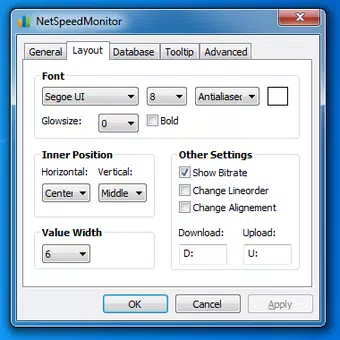
NetSpeedMonitor (32-bit) presents a clean, minimalist interface that prioritizes functionality over visual flair. The layout is straightforward, with key metrics—such as current speed and total data transferred—displayed prominently. Navigation is intuitive, relying on a system tray icon and context menu for access, which reduces clutter and maintains a low footprint on the desktop environment.
The application’s design aligns with the expectations of utility software: simple, efficient, and unobtrusive. Users can quickly access detailed views through the main window or rely on the toolbar tooltip for real-time updates. The responsiveness of the interface is consistent with its lightweight nature, ensuring smooth operation even on older Windows systems.
Although the developer did not list formal performance metrics, the app’s minimal file size and 32-bit architecture suggest optimized resource usage. It runs without significant CPU or memory overhead, making it suitable for long-term background operation. Stability appears to be maintained, as the app has remained unchanged since its 2017 release, indicating a mature and reliable codebase.
Platform Compatibility & Technical Requirements
NetSpeedMonitor (32-bit) is designed exclusively for Windows platforms. It is compatible with 32-bit Windows operating systems, though specific OS versions were not listed by the developer. The application has a file size of 1.1 MB, making it highly portable and suitable for systems with limited storage or older hardware.
Given its age and lightweight nature, the app is likely to function on Windows 7 and later versions, though official compatibility details were not provided. The developer did not specify minimum OS requirements or hardware specifications, so users are advised to test the application on their system to ensure full functionality.
As a free tool, NetSpeedMonitor (32-bit) offers accessibility without licensing barriers. Its focus on core network monitoring tasks ensures it remains relevant in a market dominated by more complex and feature-rich solutions.
Pros and Cons
Pros
- Lightweight design with minimal system resource usage
- Free to download and use with no hidden costs
- Real-time monitoring of upload and download speeds
- Comprehensive data tracking across daily and monthly periods
- Simple, intuitive interface suitable for non-technical users
Cons
- Only available for 32-bit Windows systems, limiting compatibility
- No official updates or version changes since 2017
- Developer did not provide detailed technical requirements or OS compatibility
- Limited to desktop platforms; no mobile or cross-platform support
- Basic visual design without advanced customization options
FAQ
Is NetSpeedMonitor (32-bit) safe to download and install?
Yes, the application is free and available from official sources. As a lightweight utility with no known malware associations, it is considered safe for standard Windows systems.
Can I use NetSpeedMonitor on Windows 10 or Windows 11?
While the developer did not specify compatibility, the app’s 32-bit architecture suggests it may work on Windows 10 and Windows 11 systems. However, users should verify functionality on their specific setup.
Does NetSpeedMonitor require administrative privileges?
The developer did not disclose permission requirements. Based on typical behavior of similar utilities, it may operate with standard user rights, but this has not been confirmed.
Is there a mobile version of NetSpeedMonitor?
No mobile version has been released. The app is currently limited to 32-bit Windows platforms only.
How often does NetSpeedMonitor update?
The app has not seen any version updates since its release in 2017. The developer has not announced future updates or maintenance plans.
Final Thoughts
NetSpeedMonitor (32-bit) remains a dependable solution for users who need a no-nonsense tool to monitor internet speed and data usage. Its focus on real-time bandwidth tracking, connection transparency, and historical statistics makes it a valuable asset for anyone managing network performance on older or low-resource Windows systems. While its lack of updates and 32-bit limitation may restrict broader adoption, its simplicity, efficiency, and free availability continue to offer strong value.
For users seeking a secure, lightweight, and functional network performance tool, NetSpeedMonitor (32-bit) delivers consistent results without unnecessary complexity. If you're using a 32-bit Windows environment and need reliable network insights, this app is a practical choice.
Download NetSpeedMonitor (32-bit) now


